MultiPoint
Next version — This documentation describes a major version that is not yet the current stable release of spatial-types.
What is a MultiPoint?
A MultiPoint groups Point objects into one spatial value. Its points are not connected by segments.
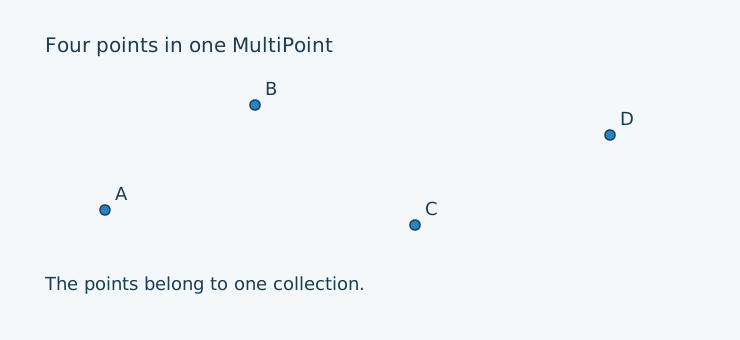
MultiPoint — Supported representations
Availability in the current version of Spatial Types:
| Coordinate layout | Geometry Mutable | Geometry Immutable | Geography Mutable | Geography Immutable |
|---|---|---|---|---|
| XY | ✅ | ✅ | ✅ | ✅ |
| XYZ | ✅ | ✅ | ✅ | ✅ |
| XYM | ✅ | ✅ | ✅ | ✅ |
| XYZM | ✅ | ✅ | ✅ | ✅ |
Creating the illustrated objects
The examples recreate the labelled objects above using Geometry in XY. Composer’s autoloader must already be loaded. Variable names match the point letters in the illustration.
Immutable objects
<?php

use LongitudeOne\SpatialTypes\Types\Dimension2\Geometry\PointImmutable;
use LongitudeOne\SpatialTypes\Types\Dimension2\Geometry\MultiPointImmutable;

// Immutable objects must be fully initialized through their constructors.

$a = new PointImmutable(10.5, 9);
$b = new PointImmutable(25.5, 19.5);
$c = new PointImmutable(41.5, 7.5);
$d = new PointImmutable(61, 16.5);

$multiPoint = new MultiPointImmutable([$a, $b, $c, $d]);
Mutable objects
<?php

use LongitudeOne\SpatialTypes\Types\Dimension2\Point;
use LongitudeOne\SpatialTypes\Types\Dimension2\MultiPoint;

$a = new Point(10.5, 9);
$b = new Point(25.5, 19.5);
$c = new Point(41.5, 7.5);
$d = new Point(61, 16.5);

// Using the constructor.
$multiPoint = new MultiPoint([$a, $b, $c, $d]);

// Alternatively, adding members with methods.
$multiPoint = new MultiPoint()
    ->addElement($a)
    ->addElement($b)
    ->addElement($c)
    ->addElement($d);